ThirdRails Zeus - Weather Stories
ThirdRails Zeus lets you create a weather forecast for your service. Instead of selecting one fixed weather preset, you create a Weather Story using a number of weather anchors. During the drive Zeus gradually changes the Train Sim World weather between these anchors.
A Story can be simple. Start with Clear weather, encounter Heavy Rain halfway through the journey and finish under Light Cloud. You define the important weather moments; Zeus creates the weather development between them.
Every time a Weather Story is started, Zeus creates a new execution plan. It can select different transition paths and durations, while the actual weather values for cloudiness, precipitation, fog and temperature are selected from ranges for the chosen season.
This means that the same Weather Story does not have to produce exactly the same weather twice. The important moments remain the same, but the way the weather develops towards them, and the exact conditions you encounter, can vary from drive to drive.
Anchors define the important weather moments. Zeus decides how to get there.
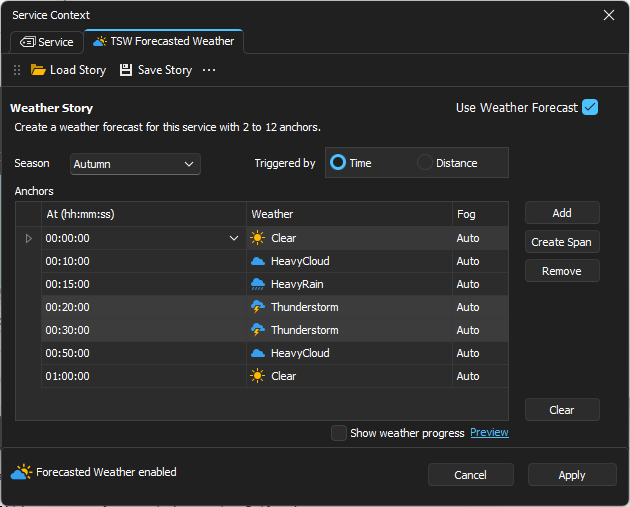
Creating a Weather Story
The Weather Story editor is available from the TSW Forecasted Weather tab in Service Context. Enable Use Weather Forecast to use the Story for the service.
Select the Season and choose whether the Story progresses by Time or Distance.
Time or Distance
Time creates evolving weather based on driving time. The weather continues to develop while your train is stopped.
Distance ties the Story to your progress along the route. When the train stops, weather progression stops as well. This can be useful when you want particular weather conditions around a certain part of the journey.
When adding anchors, the editor initially places a new Time anchor 10 minutes after the previous one, or a Distance anchor 10 km further along. These are convenient defaults, not minimum transition times or distances.
Adding anchors
An anchor tells Zeus which weather condition you want to reach and when you want to reach it. For example:
| Time | Weather |
|---|---|
| 00:00 | Clear |
| 00:20 | Thunderstorm |
| 00:45 | Clear |
The anchors are targets. The first twenty minutes in this example are not Clear weather followed by a sudden Thunderstorm. Zeus gradually develops the weather towards the Thunderstorm anchor.
Tips for creating a Story
Give the weather room to change
The most important thing when creating a Story is to allow enough room for larger weather changes. From our testing, major transitions such as:
Clear → Heavy Rain
Clear → Thunderstorm
Clear → Heavy Snow
look most natural when Zeus has approximately 20 minutes for the complete transition. This gives cloud cover, precipitation, visibility and ground conditions time to develop gradually.
If you want the change to happen in less time, you can guide it yourself by adding a logical intermediate anchor:
Clear → Heavy Cloud → Heavy Rain
Giving each step around 10 minutes works well. Smaller changes, such as Heavy Cloud → Light Cloud, can be placed closer together.
As a practical guide, about 10 minutes is the lower end for a large weather step, while 15-20 minutes usually produces a calmer and more natural transition. These are guidelines rather than fixed rules.
Do not overbuild your Story
Do not overbuild your Story. Start by adding only the important weather moments. Zeus already has transition recipes for getting from one weather condition to another.
Add intermediate anchors when you deliberately want more control over how or when a transition develops. A Story with fewer meaningful anchors will often work better than one in which every stage of the weather has been specified manually.
Holding weather with a Span
Sometimes you want a weather condition not only to arrive, but also to remain for a while. Use Create Span for this.
| Time | Weather |
|---|---|
| 00:00 | Clear |
| 00:20 | Heavy Rain |
| 00:35 | Heavy Rain |
| 00:55 | Clear |
Here Heavy Rain is reached after 20 minutes and is then deliberately held for another 15 minutes before the Story starts developing back towards Clear.
Spans are useful for rain, snow, heavy cloud or thunderstorms where you want an actual period of that weather instead of immediately moving towards the next condition.
How Zeus develops the weather
Weather profiles such as Clear, Heavy Cloud and Heavy Rain represent ranges rather than one fixed set of Train Sim World weather values. Transitions also contain alternative paths and durations.
In V1 a transition recipe can use at most one intermediate weather profile. For transitions between Clear weather and precipitation, Zeus only uses cloud profiles as the intermediate state. This prevents rain or snow from starting too early during the build-up, or continuing too long while the weather is clearing.
For example, Zeus may develop:
Clear → Heavy Cloud → Thunderstorm
while another run of the same Story may use:
Clear → Light Cloud → Thunderstorm
The same Story can be different each time
A Weather Story is therefore not completely deterministic. The anchors remain fixed, but Zeus can select different transition paths, durations and values from the ranges defined for the selected season.
The forecast remains the same, but the exact weather development can vary between drives. That variation is intentional.
Weather profiles
| Weather | General behaviour |
|---|---|
| Clear | Clear sky, no precipitation and no fog |
| Light Cloud | Partly cloudy conditions without precipitation |
| Heavy Cloud | Mostly overcast conditions without precipitation |
| Light Rain | Cloudy conditions with light precipitation |
| Heavy Rain | Heavy cloud with substantial precipitation |
| Thunderstorm | Very heavy cloud and strong precipitation |
| Light Snow | Snow conditions with light precipitation |
| Heavy Snow | Heavy cloud and stronger snow precipitation |
The actual ranges depend on the selected season. The complete values and transition recipes can be found in the Weather Reference at the end of this tutorial.
Driving with a Weather Story
When a Weather Story is active, Zeus follows the progress of the service and updates the Train Sim World weather as the Story develops towards the next anchor.
Notifications at the top of the screen show important Zeus events during the drive.
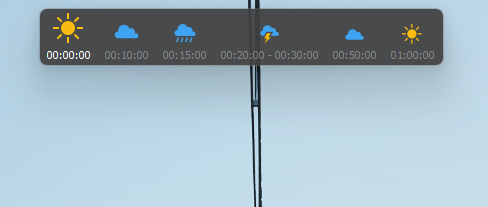
You can also enable Show weather progress in Service Context to follow the current Story while driving or testing it.
Save, Load and Share
Weather Stories can be saved and loaded again from Service Context. A saved Story contains its season, progression mode and anchors, so you can reuse a forecast for another drive or use an existing Story as the starting point for a new one.
Weather Stories are also designed to be shareable. Future Whistle Board integration is planned to allow a shared drive to include its Weather Story. Shared Stories can naturally be used as templates: load one, use it as it is, or adjust the anchors to create your own version.
Because the Story contains the forecast rather than one exact recording of generated weather, drivers can share the same Story without every drive becoming identical.
Zeus Weather Reference
The following tables contain the current profile ranges and transition definitions used by Zeus. You do not need these values to create a Weather Story; they are included as a reference for those who want to see what happens behind the scenes.
Weather Profile Definitions
Weather profiles use ranges rather than fixed values. The actual value is selected from the range when Zeus prepares the Story.
Spring
| Profile | Temperature °C | Cloudiness | Precipitation | Fog |
|---|---|---|---|---|
| Clear | 5 - 18 | 0.00 - 0.05 | 0.00 | 0.00 |
| Light Cloud | 4 - 18 | 0.20 - 0.45 | 0.00 | 0.00 - 0.03 |
| Heavy Cloud | 3 - 16 | 0.60 - 0.90 | 0.00 | 0.00 - 0.04 |
| Light Rain | 2 - 14 | 0.45 - 0.80 | 0.10 - 0.40 | 0.00 - 0.04 |
| Heavy Rain | 2 - 12 | 0.70 - 1.00 | 0.55 - 0.85 | 0.00 - 0.05 |
| Thunderstorm | 8 - 20 | 0.85 - 1.00 | 0.70 - 1.00 | 0.00 - 0.05 |
| Light Snow | -3 - 1 | 0.45 - 0.85 | 0.10 - 0.40 | 0.00 - 0.05 |
| Heavy Snow | -4 - 0 | 0.75 - 1.00 | 0.45 - 1.00 | 0.00 - 0.06 |
Summer
| Profile | Temperature °C | Cloudiness | Precipitation | Fog |
|---|---|---|---|---|
| Clear | 18 - 30 | 0.00 - 0.05 | 0.00 | 0.00 |
| Light Cloud | 17 - 29 | 0.20 - 0.45 | 0.00 | 0.00 - 0.02 |
| Heavy Cloud | 16 - 27 | 0.60 - 0.90 | 0.00 | 0.00 - 0.03 |
| Light Rain | 15 - 26 | 0.45 - 0.80 | 0.10 - 0.40 | 0.00 - 0.03 |
| Heavy Rain | 14 - 25 | 0.70 - 1.00 | 0.55 - 0.80 | 0.00 - 0.04 |
| Thunderstorm | 16 - 28 | 0.85 - 1.00 | 0.70 - 1.00 | 0.00 - 0.05 |
Autumn
| Profile | Temperature °C | Cloudiness | Precipitation | Fog |
|---|---|---|---|---|
| Clear | 4 - 16 | 0.00 - 0.05 | 0.00 | 0.00 |
| Light Cloud | 3 - 15 | 0.20 - 0.45 | 0.00 | 0.00 - 0.04 |
| Heavy Cloud | 2 - 13 | 0.60 - 0.90 | 0.00 | 0.00 - 0.05 |
| Light Rain | 2 - 12 | 0.45 - 0.80 | 0.10 - 0.40 | 0.00 - 0.05 |
| Heavy Rain | 2 - 10 | 0.70 - 1.00 | 0.55 - 0.85 | 0.00 - 0.06 |
| Thunderstorm | 7 - 17 | 0.85 - 1.00 | 0.70 - 1.00 | 0.00 - 0.06 |
| Light Snow | -3 - 1 | 0.45 - 0.85 | 0.10 - 0.40 | 0.00 - 0.05 |
| Heavy Snow | -4 - 0 | 0.75 - 1.00 | 0.45 - 1.00 | 0.00 - 0.06 |
Winter
| Profile | Temperature °C | Cloudiness | Precipitation | Fog |
|---|---|---|---|---|
| Clear | -8 - 6 | 0.00 - 0.05 | 0.00 | 0.00 |
| Light Cloud | -8 - 6 | 0.20 - 0.45 | 0.00 | 0.00 - 0.03 |
| Heavy Cloud | -6 - 6 | 0.60 - 0.90 | 0.00 | 0.00 - 0.04 |
| Light Rain | 1 - 7 | 0.45 - 0.80 | 0.10 - 0.40 | 0.00 - 0.04 |
| Heavy Rain | 1 - 7 | 0.70 - 1.00 | 0.55 - 0.85 | 0.00 - 0.05 |
| Light Snow | -5 - 1 | 0.45 - 0.85 | 0.10 - 0.40 | 0.00 - 0.05 |
| Heavy Snow | -8 - 0 | 0.75 - 1.00 | 0.45 - 1.00 | 0.00 - 0.06 |
Transition Recipes
A transition recipe describes how Zeus can move from one weather profile to another. V1 recipes use no more than one intermediate profile. Weights determine which available path is selected, while the duration is selected from the configured range.
Building weather
| From | To | Possible path | Chance | Duration |
|---|---|---|---|---|
| Clear | Thunderstorm | via Light Cloud | 40% | 5 - 10 min |
| via Heavy Cloud | 60% | 4 - 15 min | ||
| Clear | Heavy Rain | via Heavy Cloud | 80% | 5 - 15 min |
| via Light Cloud | 20% | 10 - 18 min | ||
| Clear | Light Rain | via Light Cloud | 75% | 7 - 18 min |
| via Heavy Cloud | 25% | 5 - 10 min | ||
| Clear | Heavy Cloud | via Light Cloud | 60% | 6 - 14 min |
| Direct | 40% | 3 - 8 min |
Weather clearing
| From | To | Possible path | Chance | Duration |
|---|---|---|---|---|
| Thunderstorm | Clear | via Heavy Cloud | 60% | 15 - 25 min |
| via Light Cloud | 40% | 10 - 20 min | ||
| Heavy Rain | Clear | via Heavy Cloud | 60% | 10 - 20 min |
| via Light Cloud | 40% | 12 - 22 min | ||
| Light Rain | Clear | via Light Cloud | 65% | 6 - 14 min |
| via Heavy Cloud | 35% | 10 - 18 min | ||
| Heavy Cloud | Clear | via Light Cloud | 70% | 6 - 15 min |
| Direct | 30% | 4 - 10 min |
Snow transitions
| From | To | Possible path | Chance | Duration |
|---|---|---|---|---|
| Clear | Light Snow | via Light Cloud | 75% | 7 - 18 min |
| via Heavy Cloud | 25% | 5 - 10 min | ||
| Clear | Heavy Snow | via Heavy Cloud | 80% | 5 - 15 min |
| via Light Cloud | 20% | 10 - 18 min | ||
| Light Snow | Clear | via Light Cloud | 60% | 6 - 14 min |
| via Heavy Cloud | 40% | 10 - 18 min | ||
| Heavy Snow | Clear | via Heavy Cloud | 60% | 10 - 20 min |
| via Light Cloud | 40% | 12 - 22 min |
These definitions describe the current Zeus weather model and may be adjusted as the weather engine is further calibrated.
ThirdRails - Ride Different.